
31 KiB
[tutorial v1.1_110] A variable in avanced mode
Screenshot
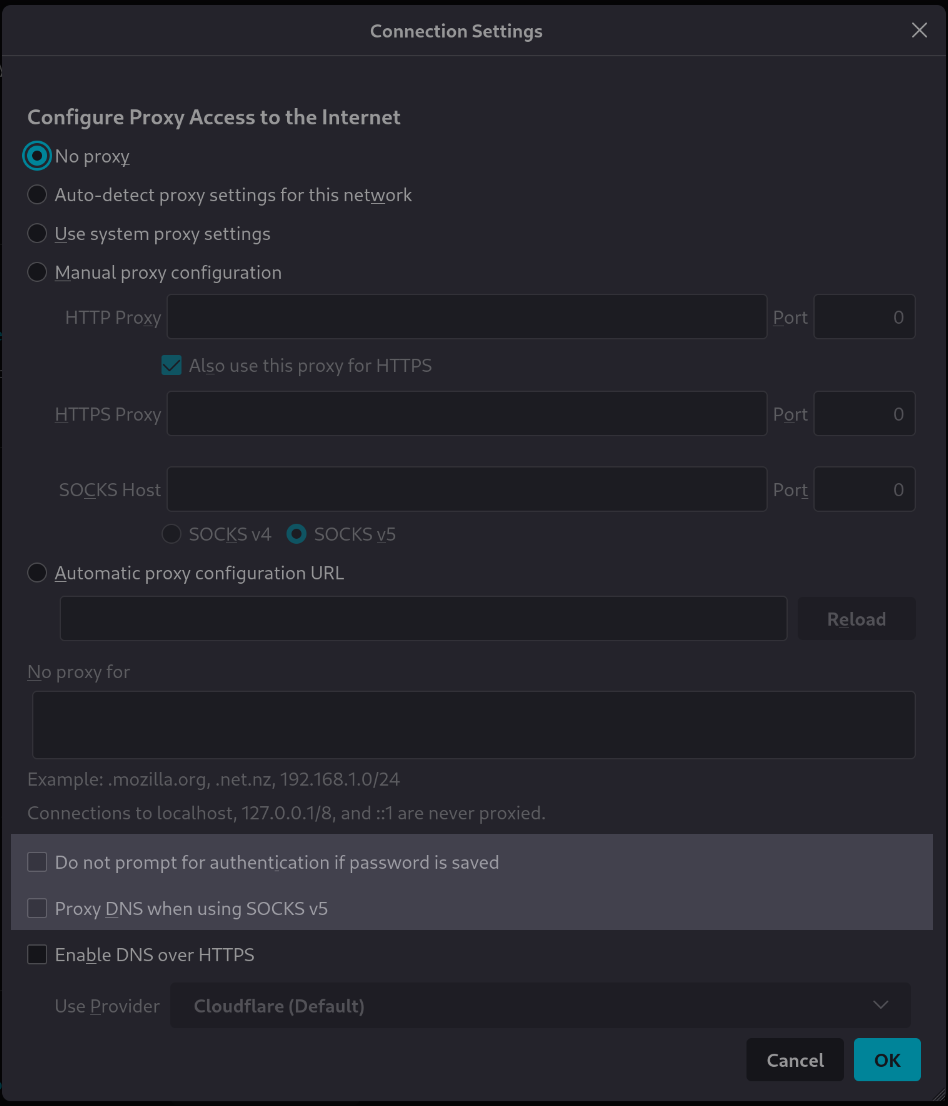
Clone and install
To test this tutorial, you need to download this repository and install Rougail:
git clone -b 1.1 https://forge.cloud.silique.fr/stove/rougail-tutorials.git
cd rougail-tutorials
python -m venv venv_rougail
. venv_rougail/bin/activate
pip install rougail-cli rougail-output-exporter rougail-output-doc rougail-user-data-yaml
Then switch to the tutorial page:
git switch --detach v1.1_110
Structure
.
├── firefox
│ ├── 00-proxy.yml
│ ├── 10-manual.yml
│ ├── 20-manual.yml
│ ├── 30-auto.yml
│ ├── 40-no_proxy.yml
│ ├── 50-prompt_authentication.yml
│ └── 55-proxy_dns_socks5.yml
└── types
└── proxy
└── 00_type.yml
Contents of the firefox/55-proxy_dns_socks5.yml file
%YAML 1.2
---
version: 1.1

proxy_dns_socks5:
  description: Use proxy DNS when using SOCKS v5
  mode: advanced
  default: false
  disabled:
    jinja: |-
      {{ _.manual.socks_proxy.version is propertyerror or _.manual.socks_proxy.version == 'v4' }}
    return_type: boolean
    description: |-
      if "_.proxy_mode" is not "Manual proxy configuration"
      or "_.manual.socks_proxy.version" is "v4"
...
Let's generate the documentation
rougail -m firefox/ --types types/proxy --modes_level basic standard advanced -o doc
| Variable | Description |
|---|---|
proxy_modechoice standard mandatory |
Configure Proxy Access to the Internet. Choices: • No proxy ← (default) • Auto-detect proxy settings for this network • Use system proxy settings • Manual proxy configuration • Automatic proxy configuration URL |
Manual proxy configuration
Note
Path: manual
basicdisabled
Disabled: when the variable "Configure Proxy Access to the Internet" hasn't the value "Manual proxy configuration"
HTTP Proxy
Note
Path: manual.http_proxy
basic
| Variable | Description |
|---|---|
manual.http_proxy.addressdomainname basic mandatory |
Proxy address. Validators: • type domainname • the domain name can be an IP |
manual.http_proxy.portport standard mandatory |
Proxy port. Validators: • well-known ports (1 to 1023) are allowed • registred ports (1024 to 49151) are allowed • private ports (greater than 49152) are allowed Default: 8080 |
| Variable | Description |
|---|---|
manual.use_for_httpsboolean standard mandatory |
Also use this proxy for HTTPS. Default: true |
HTTPS Proxy
Note
Path: manual.https_proxy
standardhidden
Hidden: when the variable "Also use this proxy for HTTPS" has the value "true"
| Variable | Description |
|---|---|
manual.https_proxy.addressdomainname standard mandatory |
Proxy address. Validators: • type domainname • the domain name can be an IP Default: the value of the variable "Proxy address" |
manual.https_proxy.portport standard mandatory |
Proxy port. Validators: • well-known ports (1 to 1023) are allowed • registred ports (1024 to 49151) are allowed • private ports (greater than 49152) are allowed Default: the value of the variable "Proxy port" |
SOCKS Proxy
Note
Path: manual.socks_proxy
basic
| Variable | Description |
|---|---|
manual.socks_proxy.addressdomainname basic mandatory |
Proxy address. Validators: • type domainname • the domain name can be an IP |
manual.socks_proxy.portport standard mandatory |
Proxy port. Validators: • well-known ports (1 to 1023) are allowed • registred ports (1024 to 49151) are allowed • private ports (greater than 49152) are allowed Default: 8080 |
manual.socks_proxy.versionchoice standard mandatory |
SOCKS host version used by proxy. Choices: • v4 • v5 ← (default) |
| Variable | Description |
|---|---|
autoweb address basic mandatory disabled |
Automatic proxy configuration URL. Validators: • well-known ports (1 to 1023) are allowed • registred ports (1024 to 49151) are allowed • type domainname • the domain name can be a hostname Disabled: when the variable "Configure Proxy Access to the Internet" hasn't the value "Automatic proxy configuration URL" |
no_proxydomainname multiple standard disabled unique |
Address for which proxy will be desactivated. Connections to localhost, 127.0.0.1/8 and ::1 are never proxied. Validators: • type domainname • the domain name can starts by a dot • the domain name can be a hostname • the domain name can be an IP • the domain name can be network in CIDR format Examples: • .mozilla.org • .net.nz • 192.168.1.0/24 Disabled: when the variable "Configure Proxy Access to the Internet" has the value "No proxy" |
prompt_authenticationboolean standard mandatory disabled |
Prompt for authentication if password is saved. Default: true Disabled: when the variable "Configure Proxy Access to the Internet" has the value "No proxy" |
proxy_dns_socks5boolean advanced mandatory disabled |
Use proxy DNS when using SOCKS v5. Default: false Disabled: if "Configure Proxy Access to the Internet" is not "Manual proxy configuration" or "SOCKS host version used by proxy" is "v4" |
Let's generate the changelog
rougail -m firefox/ --types types/proxy --modes_level basic standard advanced -o doc --doc.contents changelog --doc.changelog.previous_json_file previous.yml
Modified variables
| Variable | Description |
|---|---|
proxy_mode(None, [], ['standard'])choice standard mandatory |
Configure Proxy Access to the Internet. Choices: • No proxy ← (default) • Auto-detect proxy settings for this network • Use system proxy settings • Manual proxy configuration • Automatic proxy configuration URL |
manual.http_proxy.address(None, [], ['basic'])domainname basic mandatory |
Proxy address. Validators: • type domainname • the domain name can be an IP |
manual.http_proxy.port(None, [], ['standard'])port standard mandatory |
Proxy port. Validators: • well-known ports (1 to 1023) are allowed • registred ports (1024 to 49151) are allowed • private ports (greater than 49152) are allowed Default: 8080 |
manual.use_for_https(None, [], ['standard'])boolean standard mandatory |
Also use this proxy for HTTPS. Default: true |
manual.https_proxy.address(None, [], ['standard'])domainname standard mandatory |
Proxy address. Validators: • type domainname • the domain name can be an IP Default: the value of the variable "Proxy address" |
manual.https_proxy.port(None, [], ['standard'])port standard mandatory |
Proxy port. Validators: • well-known ports (1 to 1023) are allowed • registred ports (1024 to 49151) are allowed • private ports (greater than 49152) are allowed Default: the value of the variable "Proxy port" |
manual.socks_proxy.address(None, [], ['basic'])domainname basic mandatory |
Proxy address. Validators: • type domainname • the domain name can be an IP |
manual.socks_proxy.port(None, [], ['standard'])port standard mandatory |
Proxy port. Validators: • well-known ports (1 to 1023) are allowed • registred ports (1024 to 49151) are allowed • private ports (greater than 49152) are allowed Default: 8080 |
manual.socks_proxy.version(None, [], ['standard'])choice standard mandatory |
SOCKS host version used by proxy. Choices: • v4 • v5 ← (default) |
auto(None, [], ['basic'])web address basic mandatory disabled |
Automatic proxy configuration URL. Validators: • well-known ports (1 to 1023) are allowed • registred ports (1024 to 49151) are allowed • type domainname • the domain name can be a hostname Disabled: when the variable "Configure Proxy Access to the Internet" hasn't the value "Automatic proxy configuration URL" |
no_proxy(None, [], ['standard'])domainname multiple standard disabled unique |
Address for which proxy will be desactivated. Connections to localhost, 127.0.0.1/8 and ::1 are never proxied. Validators: • type domainname • the domain name can starts by a dot • the domain name can be a hostname • the domain name can be an IP • the domain name can be network in CIDR format Examples: • .mozilla.org • .net.nz • 192.168.1.0/24 Disabled: when the variable "Configure Proxy Access to the Internet" has the value "No proxy" |
prompt_authentication(None, [], ['standard'])boolean standard mandatory disabled |
Prompt for authentication if password is saved. Default: true Disabled: when the variable "Configure Proxy Access to the Internet" has the value "No proxy" |
proxy_dns_socks5(None, [], ['advanced'])boolean advanced mandatory disabled |
Use proxy DNS when using SOCKS v5. Default: false Disabled: if "Configure Proxy Access to the Internet" is not "Manual proxy configuration" or "SOCKS host version used by proxy" is "v4" |
User datas
Example 1
config/01/config.yml
---
Output
rougail -m firefox/ --types types/proxy --modes_level basic standard advanced -u yaml -yf config/01/config.yml
Note
Caption:
- Variable
- Default value
Variables:
- 📓 proxy_mode (Configure Proxy Access to the Internet): No proxy
Example 2
config/02/config.yml
---
proxy_mode: Manual proxy configuration
manual:
  http_proxy:
    address: http.proxy.net
Output
rougail -m firefox/ --types types/proxy --modes_level basic standard advanced -u yaml -yf config/02/config.yml
Caution
- manual (Manual proxy configuration)
- socks_proxy (SOCKS Proxy)
- address (Proxy address): 🛑 mandatory variable but has no value
Example 3
config/03/config.yml
---
proxy_mode: Manual proxy configuration
manual:
  http_proxy:
    address: http.proxy.net
proxy_dns_socks5: true
Output
rougail -m firefox/ --types types/proxy --modes_level basic standard advanced -u yaml -yf config/03/config.yml
Caution
- manual (Manual proxy configuration)
- socks_proxy (SOCKS Proxy)
- address (Proxy address): 🛑 mandatory variable but has no value
Example 4
config/04/config.yml
---
proxy_mode: Manual proxy configuration
manual:
  http_proxy:
    address: http.proxy.net
  socks_proxy:
    version: v4
Output
rougail -m firefox/ --types types/proxy --modes_level basic standard advanced -u yaml -yf config/04/config.yml
Caution
- manual (Manual proxy configuration)
- socks_proxy (SOCKS Proxy)
- address (Proxy address): 🛑 mandatory variable but has no value