No description
| config | ||
| firefox | ||
| firefox.png | ||
| foxyproxy.png | ||
| install.txt | ||
| README.md | ||
| tree.html | ||


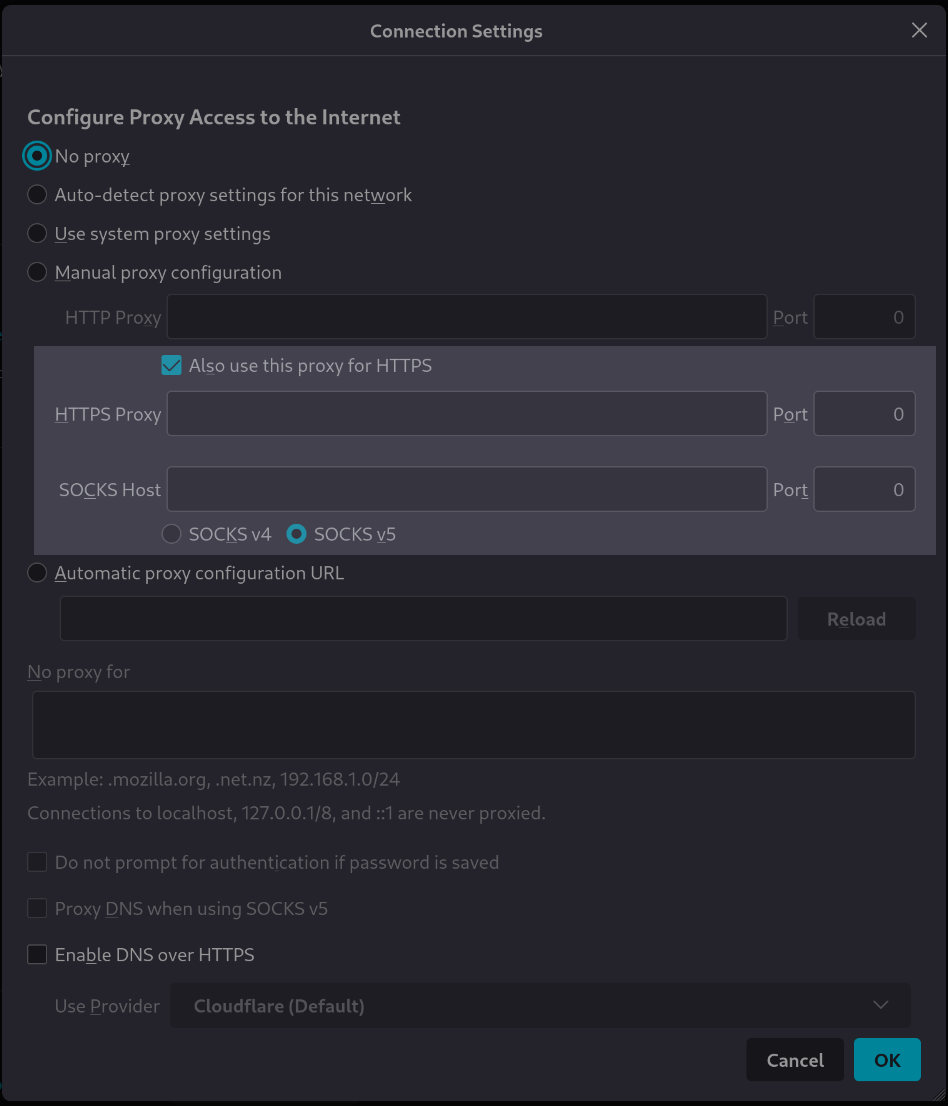
[tutorial v1.1_033] A variable with type "boolean"
Read the tutorial "A variable with type "boolean"" in the documentation
Screenshot
Clone and install
To test this tutorial, you need to download this repository and install Rougail:
git clone -b 1.1 https://forge.cloud.silique.fr/stove/rougail-tutorials.git
cd rougail-tutorials
python -m venv venv_rougail
. venv_rougail/bin/activate
pip install rougail-cli rougail-output-exporter rougail-output-doc rougail-user-data-yaml
Then switch to the tutorial page:
git switch --detach v1.1_033
Structure
.
└── firefox
├── 00-proxy.yml
├── 10-manual.yml
└── 20-manual.yml
Contents of the firefox/20-manual.yml file
%YAML 1.2
---
version: 1.1

manual:

  use_for_https: true  # Also use this proxy for HTTPS
...
Let's generate the documentation
rougail -m firefox/ -o doc
| Variable | Description |
|---|---|
proxy_modechoice mandatory |
Configure Proxy Access to the Internet. Choices: • No proxy ← (default) • Auto-detect proxy settings for this network • Use system proxy settings • Manual proxy configuration • Automatic proxy configuration URL |
Manual proxy configuration
Note
Path: manual
HTTP Proxy
Note
Path: manual.http_proxy
| Variable | Description |
|---|---|
manual.http_proxy.addressdomainname mandatory |
HTTP address. Validators: • type domainname • the domain name can be an IP |
manual.http_proxy.portport mandatory |
HTTP Port. Validators: • well-known ports (1 to 1023) are allowed • registred ports (1024 to 49151) are allowed • private ports (greater than 49152) are allowed Default: 8080 |
| Variable | Description |
|---|---|
manual.use_for_httpsboolean mandatory |
Also use this proxy for HTTPS. Default: true |
Let's generate the changelog
rougail -m firefox/ -o doc --doc.contents changelog --doc.changelog.previous_json_file previous.yml
New variable
| Variable | Description |
|---|---|
manual.use_for_httpsboolean mandatory |
Also use this proxy for HTTPS. Default: true |
User datas
Example 1
config/01/config.yml
---
manual:
  http_proxy:
    address: example.net
Output
rougail -m firefox/ -u yaml -yf config/01/config.yml
Note
Caption:
- Variable
- Default value
- Modified value
Variables:
- 📓 proxy_mode (Configure Proxy Access to the Internet): No proxy
- 📂 manual (Manual proxy configuration)
- 📂 http_proxy (HTTP Proxy)
- 📓 address (HTTP address): example.net ← loaded from the YAML file "config/01/config.yml"
- 📓 port (HTTP Port): 8080
- 📓 use_for_https (Also use this proxy for HTTPS): true
- 📂 http_proxy (HTTP Proxy)
Example 2
config/02/config.yml
---
manual:
  http_proxy:
    address: example.net
  use_for_https: false
Output
rougail -m firefox/ -u yaml -yf config/02/config.yml
Note
Caption:
- Variable
- Default value
- Modified value
- (⏳ Original default value)
Variables:
- 📓 proxy_mode (Configure Proxy Access to the Internet): No proxy
- 📂 manual (Manual proxy configuration)
- 📂 http_proxy (HTTP Proxy)
- 📓 address (HTTP address): example.net ← loaded from the YAML file "config/02/config.yml"
- 📓 port (HTTP Port): 8080
- 📓 use_for_https (Also use this proxy for HTTPS): false ← loaded from the YAML file "config/02/config.yml" (⏳ true)
- 📂 http_proxy (HTTP Proxy)