No description
| config | ||
| firefox | ||
| firefox.png | ||
| foxyproxy.png | ||
| install.txt | ||
| README.md | ||
| tree.html | ||


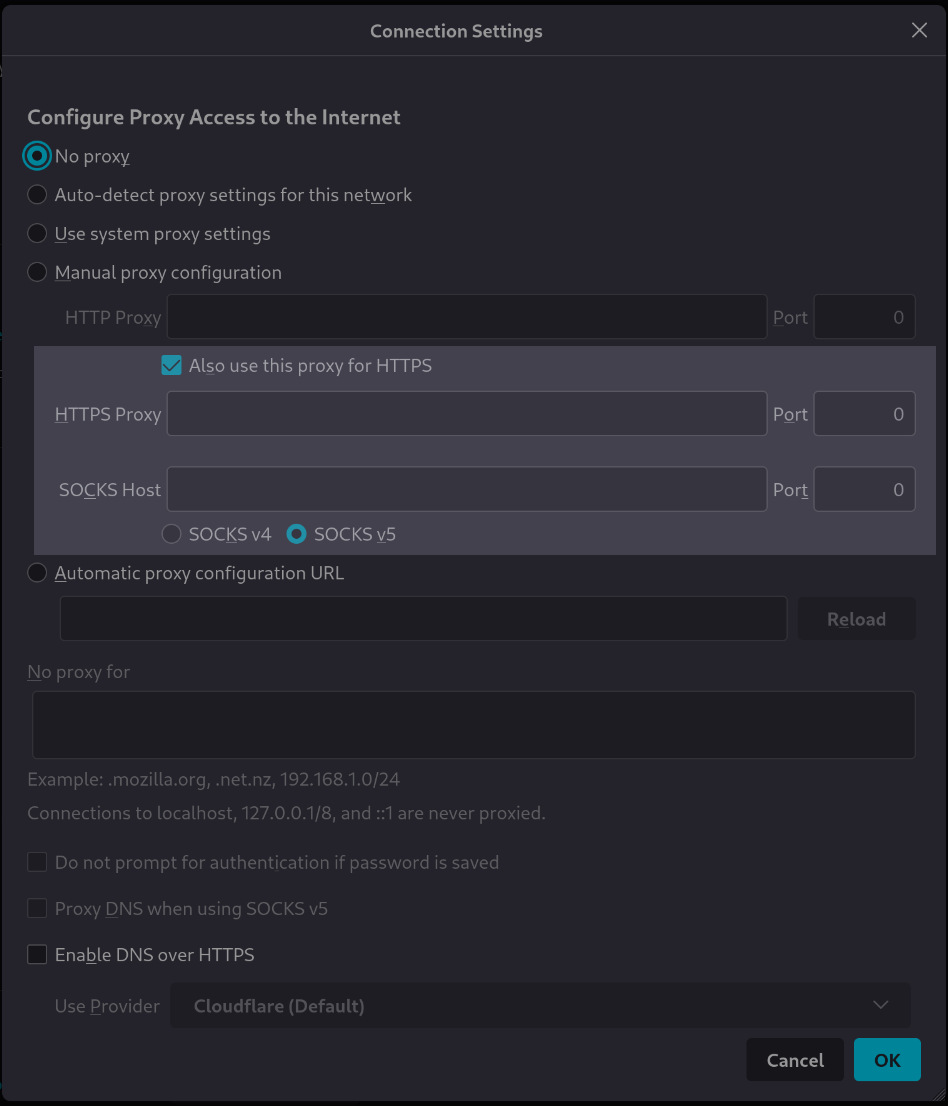
[tutorial v1.1_033] A variable with type "boolean"
Screenshot
Clone and install
To test this tutorial, you need to download this repository and install Rougail:
git clone -b 1.1 https://forge.cloud.silique.fr/stove/rougail-tutorials.git
cd rougail-tutorials
python -m venv venv_rougail
. venv_rougail/bin/activate
pip install rougail-cli rougail-output-exporter rougail-output-doc rougail-user-data-yaml
Then switch to the tutorial page:
git switch --detach v1.1_033
Structure
.
└── firefox
├── 00-proxy.yml
├── 10-manual.yml
└── 20-manual.yml
Contents of the firefox/20-manual.yml file
%YAML 1.2
---
version: 1.1

manual:

  use_for_https: true  # Also use this proxy for HTTPS
...
Let's generate the documentation
rougail -m firefox/ -o doc
| Variable | Description |
|---|---|
proxy_modechoice mandatory |
Configure Proxy Access to the Internet. Choices: • No proxy ← (default) • Auto-detect proxy settings for this network • Use system proxy settings • Manual proxy configuration • Automatic proxy configuration URL |
Manual proxy configuration
Note
Path: manual
HTTP Proxy
Note
Path: manual.http_proxy
| Variable | Description |
|---|---|
manual.http_proxy.addressdomainname mandatory |
HTTP address. Validators: • type domainname • the domain name can be an IP |
manual.http_proxy.portport mandatory |
HTTP Port. Validators: • well-known ports (1 to 1023) are allowed • registred ports (1024 to 49151) are allowed • private ports (greater than 49152) are allowed Default: 8080 |
| Variable | Description |
|---|---|
manual.use_for_httpsboolean mandatory |
Also use this proxy for HTTPS. Default: true |
Let's generate the changelog
rougail -m firefox/ -o doc --doc.contents changelog
New variable
| Variable | Description |
|---|---|
manual.use_for_httpsboolean mandatory |
Also use this proxy for HTTPS. Default: true |
User datas
Example 1
config/01/config.yml
---
manual:
  http_proxy:
    address: example.net
Output
rougail -m firefox/ -u yaml -yf config/01/config.yml
Note
Caption:
- Variable
- Default value
- Modified value
Variables:
- 📓 proxy_mode (Configure Proxy Access to the Internet): No proxy
- 📂 manual (Manual proxy configuration)
- 📂 http_proxy (HTTP Proxy)
- 📓 address (HTTP address): example.net ← loaded from the YAML file "config/01/config.yml"
- 📓 port (HTTP Port): 8080
- 📓 use_for_https (Also use this proxy for HTTPS): true
- 📂 http_proxy (HTTP Proxy)
Example 2
config/02/config.yml
---
manual:
  http_proxy:
    address: example.net
  use_for_https: false
Output
rougail -m firefox/ -u yaml -yf config/02/config.yml
Note
Caption:
- Variable
- Default value
- Modified value
- (⏳ Original default value)
Variables:
- 📓 proxy_mode (Configure Proxy Access to the Internet): No proxy
- 📂 manual (Manual proxy configuration)
- 📂 http_proxy (HTTP Proxy)
- 📓 address (HTTP address): example.net ← loaded from the YAML file "config/02/config.yml"
- 📓 port (HTTP Port): 8080
- 📓 use_for_https (Also use this proxy for HTTPS): false ← loaded from the YAML file "config/02/config.yml" (⏳ true)
- 📂 http_proxy (HTTP Proxy)