No description
| config | ||
| firefox | ||
| firefox.png | ||
| foxyproxy.png | ||
| install.txt | ||
| README.md | ||
| tree.html | ||


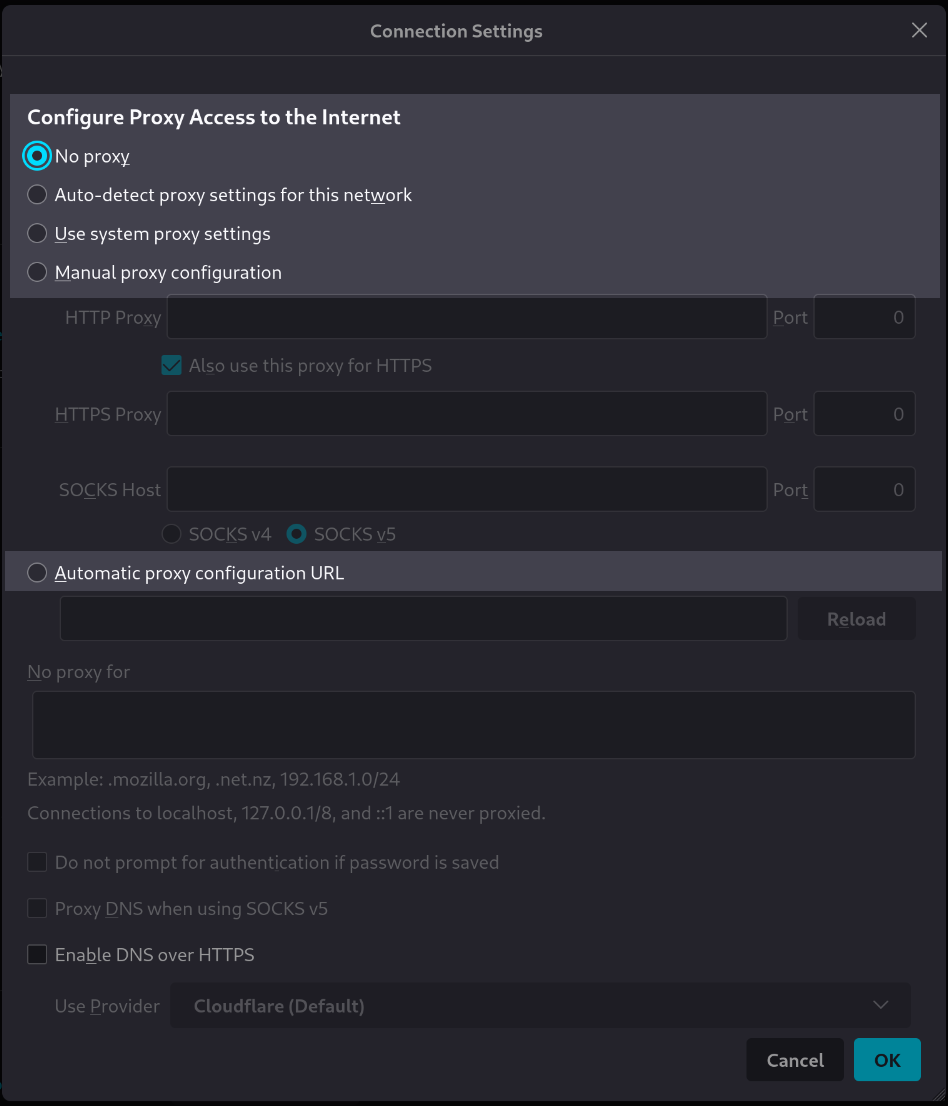
[tutorial v1.1_010] A variable with a list of possible values
Read the tutorial "A variable with a list of possible values" in the documentation
Screenshot
Clone and install
To test this tutorial, you need to download this repository and install Rougail:
git clone -b 1.1 https://forge.cloud.silique.fr/stove/rougail-tutorials.git
cd rougail-tutorials
python -m venv venv_rougail
. venv_rougail/bin/activate
pip install rougail-cli rougail-output-exporter rougail-output-doc rougail-user-data-yaml
Then switch to the tutorial page:
git switch --detach v1.1_010
Structure
.
└── firefox
└── 00-proxy.yml
Contents of the firefox/00-proxy.yml file
%YAML 1.2
---
version: 1.1

proxy_mode:
  description: Configure Proxy Access to the Internet
  choices:
    - No proxy
    - Auto-detect proxy settings for this network
    - Use system proxy settings
    - Manual proxy configuration
    - Automatic proxy configuration URL
  default: No proxy
...
Let's generate the documentation```shell
rougail -m firefox/ -o doc
| Variable | Description |
|------------------------------------------------------------------------------------------------------------------------------------------------------------|------------------------------------------------------------------------------------------------------------------------------------------------------------------------------------------------------------------------------------------------------------------------------|
| **<a id="proxy_mode" name="proxy_mode">proxy_mode</a>**<br/>[`choice`](https://rougail.readthedocs.io/en/latest/variable.html#variables-types) `mandatory` | Configure Proxy Access to the Internet.<br/>**Choices**: <br/>• No proxy **← (default)**<br/>• Auto-detect proxy settings for this network<br/>• Use system proxy settings<br/>• Manual proxy configuration<br/>• Automatic proxy configuration URL |
***
### Let's generate the changelog```shell
rougail -m firefox/ -o doc --doc.contents changelog --doc.changelog.previous_json_file previous.yml
Modified variable
| Variable | Description |
|---|---|
proxy_modechoice mandatory |
Configure Proxy Access to the Internet. Choices: • No proxy ← (default) • Auto-detect proxy settings for this network • Use system proxy settings • Manual proxy configuration • Automatic proxy configuration URL |
User datas### Example 1#### config/01/config.yml
---
Output```shell
rougail -m firefox/ -u yaml -yf config/01/config.yml
> [!NOTE]
>
> **Caption:**
> - Variable
> - <span style="color: #B8860B">Default value</span>

Variables:
- :notebook: proxy_mode (Configure Proxy Access to the Internet): <span style="color: #B8860B">No proxy</span>

***
### Example 2#### config/02/config.yml
```yml
---
proxy_mode: No proxy
Output```shell
rougail -m firefox/ -u yaml -yf config/02/config.yml
> [!NOTE]
>
> **Caption:**
> - Variable
> - <span style="color: #006400">Modified value</span>
> - (:hourglass_flowing_sand: Original default value)

Variables:
- :notebook: proxy_mode (Configure Proxy Access to the Internet): <span style="color: #006400">No proxy</span> ← loaded from the YAML file "config/02/config.yml" (:hourglass_flowing_sand: No proxy)

***
### Example 3#### config/03/config.yml
```yml
---
proxy_mode: Manual proxy configuration
Output```shell
rougail -m firefox/ -u yaml -yf config/03/config.yml
> [!NOTE]
>
> **Caption:**
> - Variable
> - <span style="color: #006400">Modified value</span>
> - (:hourglass_flowing_sand: Original default value)

Variables:
- :notebook: proxy_mode (Configure Proxy Access to the Internet): <span style="color: #006400">Manual proxy configuration</span> ← loaded from the YAML file "config/03/config.yml" (:hourglass_flowing_sand: No proxy)

***
### Example 4#### config/04/config.yml
```yml
---
proxy_mode: foo
Output```shell
rougail -m firefox/ -u yaml -yf config/04/config.yml
> [!WARNING]
>
> - proxy_mode (Configure Proxy Access to the Internet): :bell: <span style="color: #EFBF04">the value "foo" is an invalid choice, only "Auto-detect proxy settings for this network", "Automatic proxy configuration URL", "Manual proxy configuration", "No proxy" and "Use system proxy settings" are allowed, it will be ignored when loading from the YAML file "config/04/config.yml"</span>

> [!NOTE]
>
> **Caption:**
> - Variable
> - <span style="color: #B8860B">Default value</span>

Variables:
- :notebook: proxy_mode (Configure Proxy Access to the Internet): <span style="color: #B8860B">No proxy</span>

***
#### Output when invalid user data is an error```shell
rougail -m firefox/ -u yaml -yf config/04/config.yml --cli.invalid_user_data_error
Caution
- proxy_mode (Configure Proxy Access to the Internet): 🛑 the value "foo" is an invalid choice, only "Auto-detect proxy settings for this network", "Automatic proxy configuration URL", "Manual proxy configuration", "No proxy" and "Use system proxy settings" are allowed, it has been loading from the YAML file "config/04/config.yml"